
Setting Up Permissions
Log in to Autotask.
Navigate to Admin > Company Settings & Users > Resources/Users (HR) > Security Levels.
Copy a new Security Level with the following permissions to set up alerts:
-
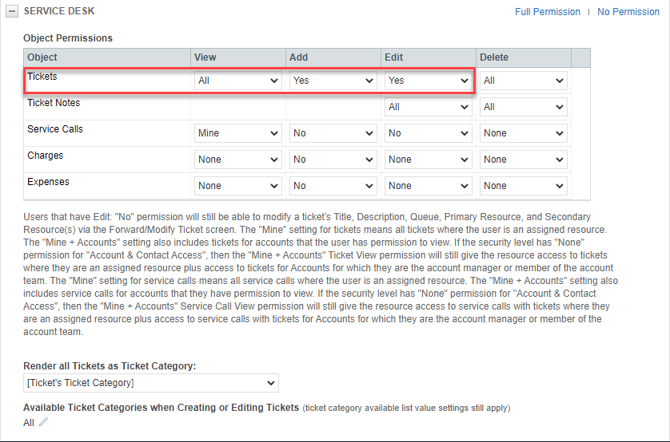
Add to the Service Desk Tickets View, Add and Edit Permissions
-
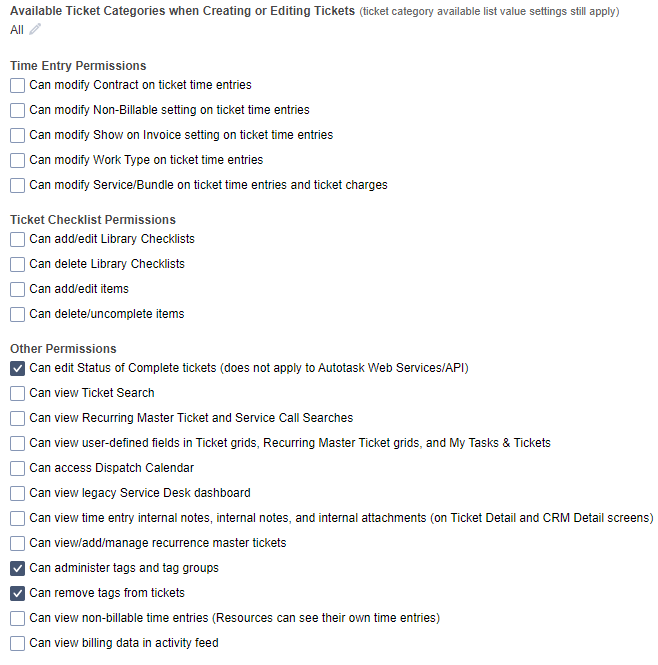
Under Service Desk -> Other Permissions, select Can edit Status of complete tickets, Can administer tags and tag groups, and Can remove tags from tickets.
Autotask Service Queues must have a resource assigned within Autotask for it to appear within the board selection dropdown.
That is all the permissions required to allow alerts to function correctly.
Please do ensure that this Security Level is assigned to an API User.